
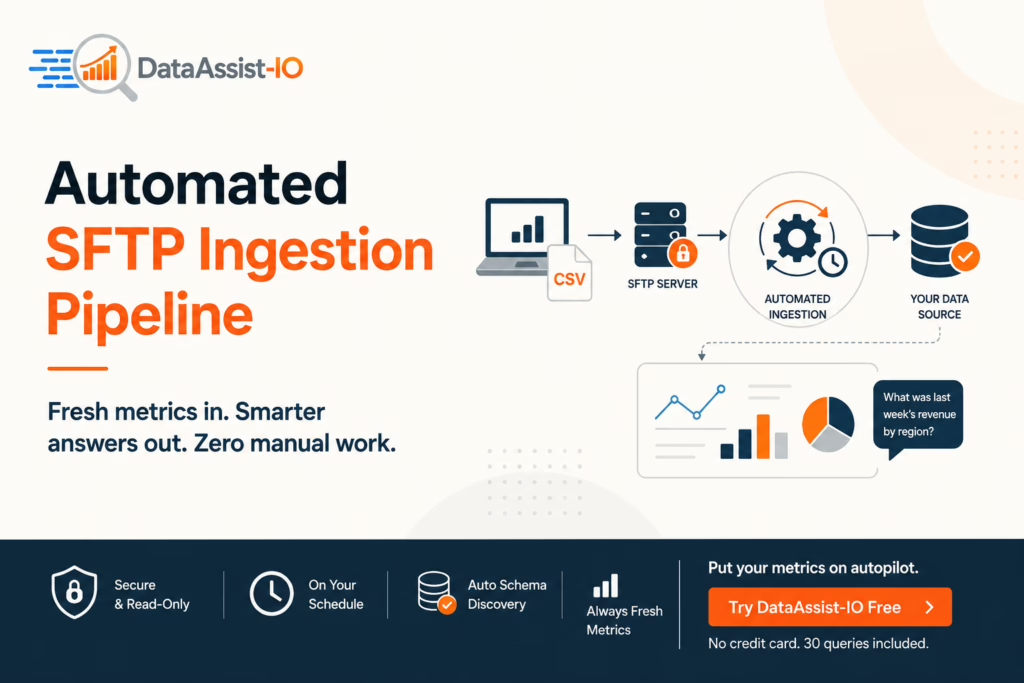
An automated SFTP ingestion pipeline is a scheduled, secure connection that picks up files (usually CSV exports) from an SFTP server, loads them into your data source and updates your numbers without anyone re-uploading anything by hand. With DataAssist-IO, your metrics stay current on a schedule you set: a fresh file lands and the next question you ask reflects it. No analyst, no manual refresh, no stale dashboards.
How an SFTP ingestion pipeline actually works
SFTP (Secure File Transfer Protocol) is a protected spot where systems can drop files. Your CRM, billing tool or ERP exports a CSV on a set rhythm and places it on the SFTP server. The ingestion pipeline watches that location, grabs each new file as it arrives and loads the rows into your DataAssist-IO data source. Auto schema discovery reads the columns for you, so there is no manual mapping step and no field-matching to babysit.
Because the pickup runs on a schedule like nightly, hourly, weekly or as per your call, the data behind your questions refreshes on its own. The whole flow is read-only: the pipeline reads your file and loads it, but it can never write back to or alter your source systems.
What “refreshing metrics” really means here
When you ask a question in plain English through Claude or ChatGPT, the answer is built from whatever rows are currently loaded in your data source. So the moment the pipeline swaps in a newer file, your next question pulls from the updated numbers. Ask “What was last week’s revenue by region?” on Monday and again on Friday and you get two different, correct answers because the underlying data moved, not because you did anything.
Ready to put your own files on autopilot?
Create a free DataAssist-IO account and connect your first source in a couple of minutes.
Setting a refresh schedule that fits your reporting
You decide how often the pipeline runs. Finance teams closing the books might pull a fresh file once a day. A sales team tracking live pipeline could refresh every hour. The schedule is tied to the cadence of your exports, so you are never waiting on a person to remember to send a report. Pair this with the business context layer where you define terms like ARR, MRR or churn once and every refreshed answer speaks your language, not raw column names.
How to get clean, reliable refreshes
A pipeline is only as good as the files you feed it. A few habits keep your metrics trustworthy:
- Name your files consistently. A predictable pattern (like
sales_2026_06.csv) makes each drop easy to track. - Keep the column structure stable. If headers shift around every export, your numbers get harder to trust.
- Strip out summary rows and totals before the file lands. Let DataAssist-IO do the math from raw rows instead.
- Match the schedule to your reporting rhythm, i.e. hourly for live pipeline, daily for finance, weekly for slower reports.
- Define your business terms once in the context layer so every refreshed answer stays consistent.
Think about your last “let me pull that number for you” moment, how much faster would the decision have been if the answer was already waiting?
Put Your Metrics on Autopilot
Stop chasing fresh numbers. Set up an automated SFTP ingestion pipeline once and your data refreshes itself while you ask questions in plain English. Start free — no credit card, 30 queries included and see your first hands-off refresh today.